Aim:
In this lab, we are trying to perform a network footprinting and packet sniffing for discovering any useful information or of the target network.
Que1. Summarise the information discovered in the Lab about the network topology.
Network topology is layout of the network showing us how the nodes connecting with each other. We can use Zenmap to scan several IP addresses inside the network at the same time. The Nmap result contain several important information for learning about the network (may be a target). For example we know that:
- Port number with states
- Port services
- Remote access capabilities
- Operating system
- Security mechanism
On the topology tap of a Zenmap result, we can are able to visualize the topology graph of the network and identify the network host as well.
In the Lab, I have found that the topology of the network is start shape which is shown below. Because in the center we can see a central node and connected to another node in different direction.

Que2. How can packet sniffing be used to detect potential issues on a network?
We can use Wireshark to perform a packet sniffing on the target IP. In the lab we use Nmap to scan TCP port using SYN packet. At the same time, we are using Wireshark to Capture the package. After have a closer look the result form Wireshark, we discover that one of the sources reply a ACK signal which means that the port is ready to establish a connection.
By this method we can identify the vulnerable host of the network and try to increase the security for that host.
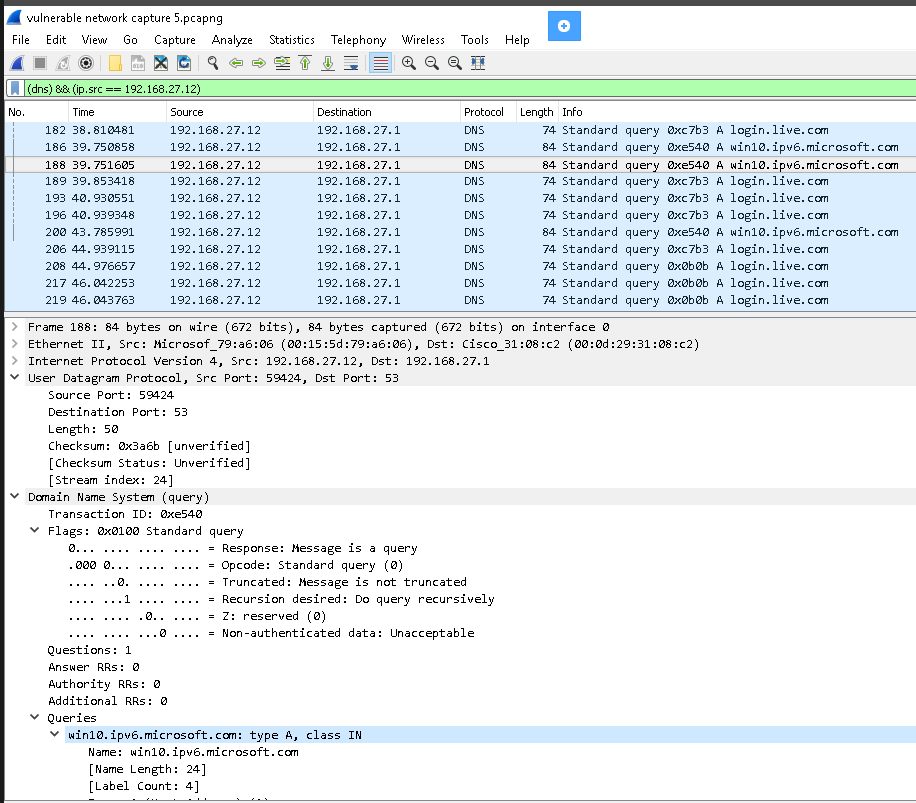
Que 3. Analyze the captured packets from Exercise 2 and filter the DNS requests sent from 192.168.27.12 to 192.168.27.1 and view the UDP stream. What can you tell about the DNS request?
Form the packet capture data on Wireshark, filter out the others show DNS and the IP of 192.168.27.12. First, the lower part of the screen shows us using UDP with a large port number and go to the server of port 53. Second the flag query is 0, means that the message is a query. Third on the Queries part, it shows different address from different message, such as “login.live.com” and “win10.ipv6.microsoft.com”. which means the message is asking of IP of these websites.
 Albert's blog